

* A small archive has appeared.

UNDERTALE Mods DB

A dedicated UNDERTALE mod sub-site for sonicFanTech projects. The main page changes its background and character placement each time you come back to it.

* Current Archive

Two UNDERTALE Mods

The archive now includes the UNDERTALE Debug Menu Port and Settings+, a quality-of-life overhaul for UNDERTALE's settings and C Menu.

OPEN MOD LIST

* Latest Release

Settings+ v1

Adds a tabbed settings menu, audio sliders, window options, real border support, and in-game C Menu shortcuts.

VIEW SETTINGS+

* Patch Reminder

Use a Backup

These downloads are mod packages and patch scripts. They do not include UNDERTALE itself, data.win, or a pre-patched copy of the game. Keep a clean backup before using UMT.

* Downloads

MOD LIST

All UNDERTALE mod downloads currently available in this archive.

* Mod Page

UNDERTALE SETTINGS+

A quality-of-life settings overhaul for the PC version of UNDERTALE.

* Overview

What It Does

Settings+ upgrades UNDERTALE's basic settings room into a more useful tabbed menu. It also adds SETTINGS and MAIN MENU entries to the in-game C Menu, so you can change options or return to the title without closing the game.

Version: v1 Package: UT_Settings+.zip Tool: UndertaleModTool

* Included

Highlights

  • Tabbed Settings+ menu with General, Video, Audio, and Controls pages.
  • Fullscreen, window size, language, border, and save-config options.
  • Master, Music, and SFX volume settings.
  • In-game C Menu shortcuts for SETTINGS and MAIN MENU.
  • Optional border image import from the included border image zip.
  • Saves extra settings to UNDERTALE's normal config.ini location.
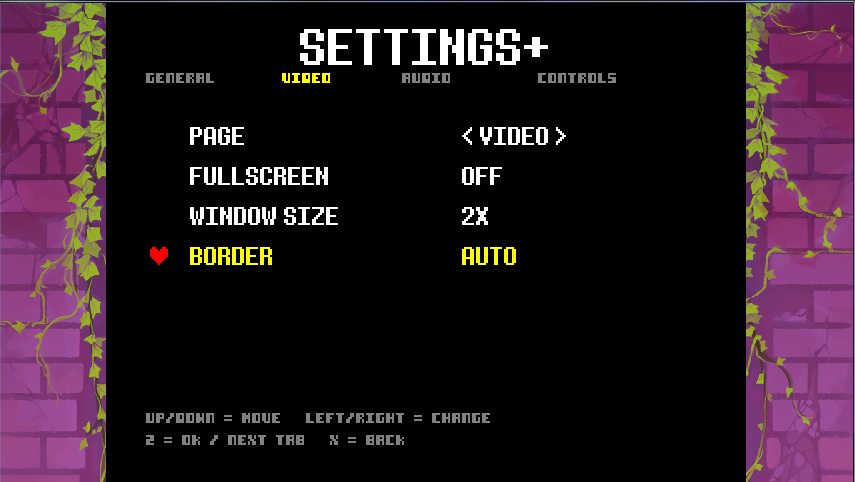
Settings+ title menu with tabs and settings rows
TITLE SETTINGS+ — tabbed settings from room_settings.
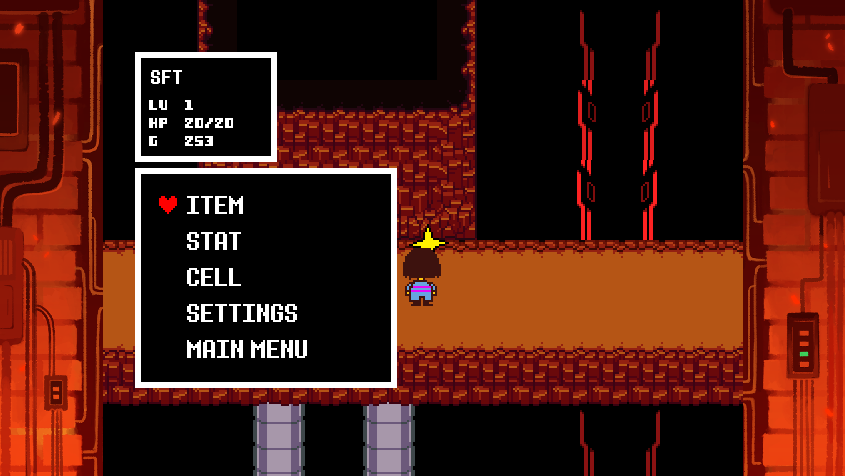
Settings+ entry inside UNDERTALE's in-game C Menu
C MENU — SETTINGS and MAIN MENU entries while playing.

* Quick Install

Patch Steps

  1. Back up your UNDERTALE data.win.
  2. Extract UT_Settings+.zip.
  3. Open data.win in UndertaleModTool.
  4. Run UT_Settings_Overhaul_v1.csx from UMT's script menu.
  5. Choose whether to import the included border images when prompted.
  6. Save the patched file and launch UNDERTALE.

* Config

Saved Settings

Settings+ writes its options to UNDERTALE's normal local settings file:

C:\Users\YOURNAME\AppData\Local\UNDERTALE\config.ini

Use SAVE CONFIG inside Settings+ after changing options you want to keep.

* Mod Page

UNDERTALE DEBUG MENU PORT

A classic UNDERTALE debug tool ported from sonicFanTech's DELTARUNE Debug Menu project.

* Overview

What It Does

This mod is the UNDERTALE/classic GameMaker port of sonicFanTech's DELTARUNE Debug Menu project. It keeps the usable debug systems while removing the GMS2-only features that do not fit UNDERTALE.

Version: v1.2 Script: SFT_UTDM_Port_v1_2.csx Tool: UndertaleModTool

* Included

Highlights

  • Classic UNDERTALE-compatible debug menu behavior.
  • Built from the DELTARUNE Debug Menu project as a port.
  • GMS2-only features removed for classic engine limits.
  • Distributed as a UMT .csx patch script.

* Quick Install

Patch Steps

  1. Back up your UNDERTALE data.win.
  2. Open the game file in UndertaleModTool.
  3. Run SFT_UTDM_Port_v1_2.csx from the scripts menu.
  4. Save the patched output.
  5. Launch the game and open the debug menu with F3.

* Quick Controls

Menu Input

F3
Open or close the debug menu.
Esc
Back or close.
Enter
Select the current row.
Up / Down
Move through menu rows.

* How to install

INSTALL

  1. Back up your UNDERTALE data.win before changing anything.
  2. Download the mod package you want from the MOD LIST.
  3. Open UNDERTALE's data.win in UndertaleModTool.
  4. Run the mod's included .csx file from UMT's script menu.
  5. If a mod asks about optional assets, follow the prompt and select the included folder or zip contents.
  6. Save the patched copy and keep your clean backup somewhere safe.
  7. Start UNDERTALE and test the mod before adding more patches.

* Settings+ Install

UT_Settings+.zip

  1. Extract UT_Settings+.zip.
  2. Run UT_Settings_Overhaul_v1.csx in UndertaleModTool.
  3. When asked, import the included borders if you want the real border images.
  4. Use SAVE CONFIG inside Settings+ after changing settings.

* Debug Menu Install

SFT_UTDM_Port_v1_2.csx

  1. Open your clean data.win in UndertaleModTool.
  2. Run SFT_UTDM_Port_v1_2.csx.
  3. Save the patched game file.
  4. Press F3 in-game to open the menu.

* Settings+

CONTROLS

Arrow Keys
Move between rows or change the selected setting.
Z / Enter
Confirm the selected row.
X / Shift
Go back or exit a page.
C Menu
Choose SETTINGS while playing to open Settings+.
Main Menu
Choose MAIN MENU from the C Menu to return to the title.

* Debug Menu Port

Debug Controls

F3
Open or close the debug menu.
Esc
Back or close.
Backspace
Back, or delete one search character.
Up / Down
Move through menu rows.
Enter
Select a row or run an action.

* Credits

CREDITS

Mod and site work by sonicFanTech. Settings+ and the UNDERTALE Debug Menu Port are fan-made UNDERTALE mods made for use with UndertaleModTool.

UNDERTALE is by Toby Fox. This is a fan-made mod archive and is not an official UNDERTALE website.

Mod Notice

Use these mods with a legally owned copy of UNDERTALE. Keep a clean backup of your original data.win so you can restore the game at any time.